


Akai Mpk Mini article
The Ultimate Guide to Akai Mpk Mini
What's actually on this compact MIDI controller, how it fits into a modern setup, and where it genuinely falls short.
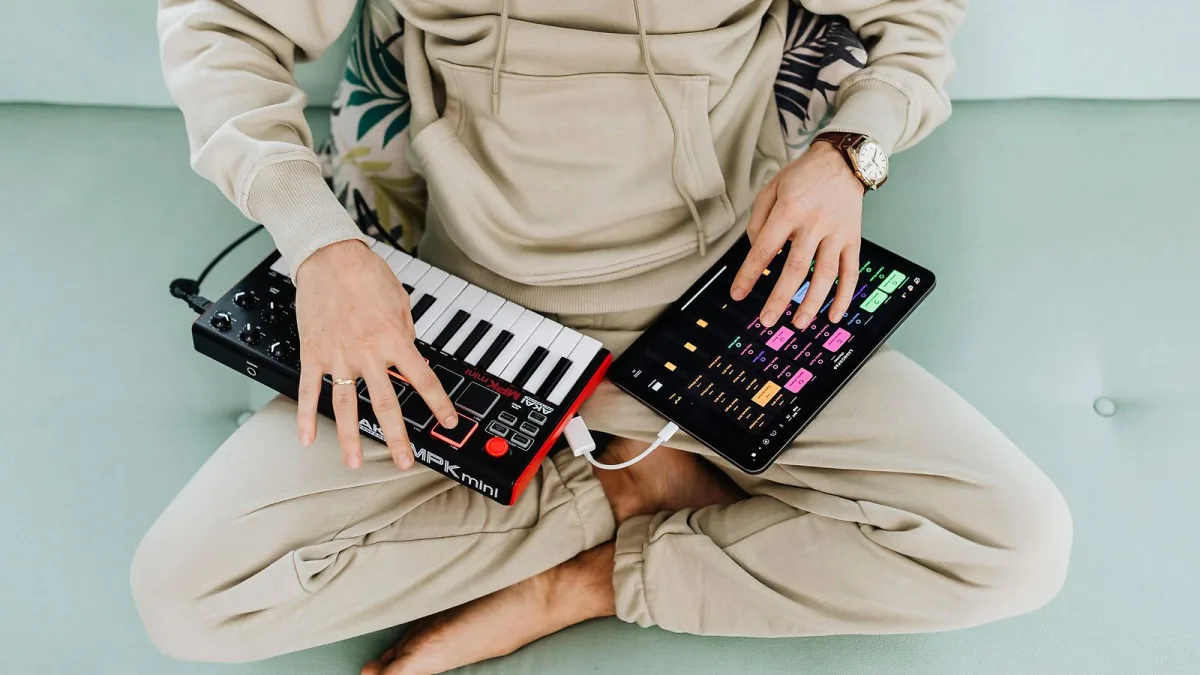
If you've spent any time browsing home-studio gear, you've almost certainly seen this little keyboard sitting on someone's desk. It's small, it's genuinely useful, and it's also frequently misunderstood by newcomers who expect it to do more — or less — than it actually does. Let's sort out exactly what an Akai MPK Mini is, what's on it, and how it fits into a modern production setup.
What It Actually Is
The Akai MPK Mini is a compact USB MIDI controller: a keyboard-shaped device that sends performance data to your computer rather than producing any sound on its own. Press a key, and it tells your software — a virtual synth, a sampler, a drum instrument — what note was played and how hard. The sound itself comes entirely from that software, not from the controller.
What's Actually On It
The current standard model, the MK3, packs a surprising amount into a small footprint:
- 25 velocity-sensitive mini keys — smaller than full-size piano keys, spanning roughly two octaves at a time, with octave-up and octave-down buttons extending the usable range considerably.
- Eight backlit, velocity-sensitive pads — the MPC-style pads Akai is known for, arranged across two banks for drum hits, samples or clip triggering.
- Eight assignable rotary encoders — these are "endless" knobs rather than fixed-position dials, so they don't need to physically match a saved setting when you load a project.
- A configurable X/Y joystick — commonly mapped to pitch bend, modulation or filter movement, depending on the software in use.
- An OLED display, built-in arpeggiator and Note Repeat function, and USB bus power, meaning no separate power adapter is generally needed.
The Wider Family
The MK3 isn't the only version worth knowing about. The MPK Mini Play MK3 adds built-in sounds, letting it work as a standalone instrument without a computer attached, using its own small speaker or headphones. The larger MPK Mini Plus steps up to 37 keys, adds pitch and modulation wheels, a two-track step sequencer, chord and scale modes, and genuine hardware connectivity through 5-pin MIDI and CV/Gate outputs — features the standard MK3 doesn't offer.
What It's Genuinely Good At
Portability is the headline strength: it's light, small enough for a backpack, and needs nothing more than a single USB cable to get going. The combination of keys, pads and knobs in one unit also makes it a genuinely capable all-in-one controller for anyone working primarily inside a DAW — playing a bassline, programming a beat and tweaking a filter without swapping devices.
Where It Genuinely Falls Short
Twenty-five mini keys is a real limitation for two-handed playing or serious piano technique — it suits basslines, chords and short melodic parts far better than full performance playing. The standard MK3 also has no internal sound engine and, unlike the Plus, no conventional MIDI DIN or CV connections for controlling external hardware synths. It's a computer-based tool first, not a standalone instrument.
What Software It Actually Works With
An Akai MPK Mini ships with Akai's MPC Beats software and a bundle of AIR Music Technology instruments, installed through Akai's own software manager after registering the device. From there, it works as a standard USB MIDI device inside essentially any modern DAW — Ableton Live, FL Studio, Logic Pro and others — once selected as a MIDI input.
Deciding If It's Right for You
If you're weighing this up against other options, or trying to work out which version of the family actually suits your setup, this complete buyer's guide walks through exactly what to check, and the best options for the money breaks the range down by use case. New to MIDI controllers altogether? This beginner's guide starts from the very beginning.
Size and Build, Briefly
It's genuinely compact: roughly the footprint of a large tablet and light enough to barely notice in a bag. That size is entirely deliberate — the whole design brief is fitting a keyboard, pads and knobs onto a desk, or into a rucksack, without demanding a dedicated studio setup. It won't feel as sturdy as a full-size stage keyboard, but for a controller that's meant to travel, that trade-off is a sensible one.
A Quick Note on Naming
You may occasionally see references online to newer or unreleased versions beyond the current MK3 and Plus. Treat any such claims with caution until they appear on Akai's own official product pages — unverified rumours circulate faster than manufacturers confirm new hardware, and it's easy to end up chasing a model that doesn't actually exist yet.
The Bottom Line
An Akai MPK Mini earns its popularity honestly: it packs a genuinely useful set of tools into a small, affordable, portable box. Understand what it can't do — make sound on its own, or replace a proper keyboard for serious playing — and what's left is a thoroughly dependable little production companion.




Comments