


Virtual DJ article
Virtual Dj Explained: Features, Types and Tips
VirtualDJ has topped DJ software shortlists for years — here's what it actually does, how its pieces fit together, and where its 2026 AI features earn their keep.
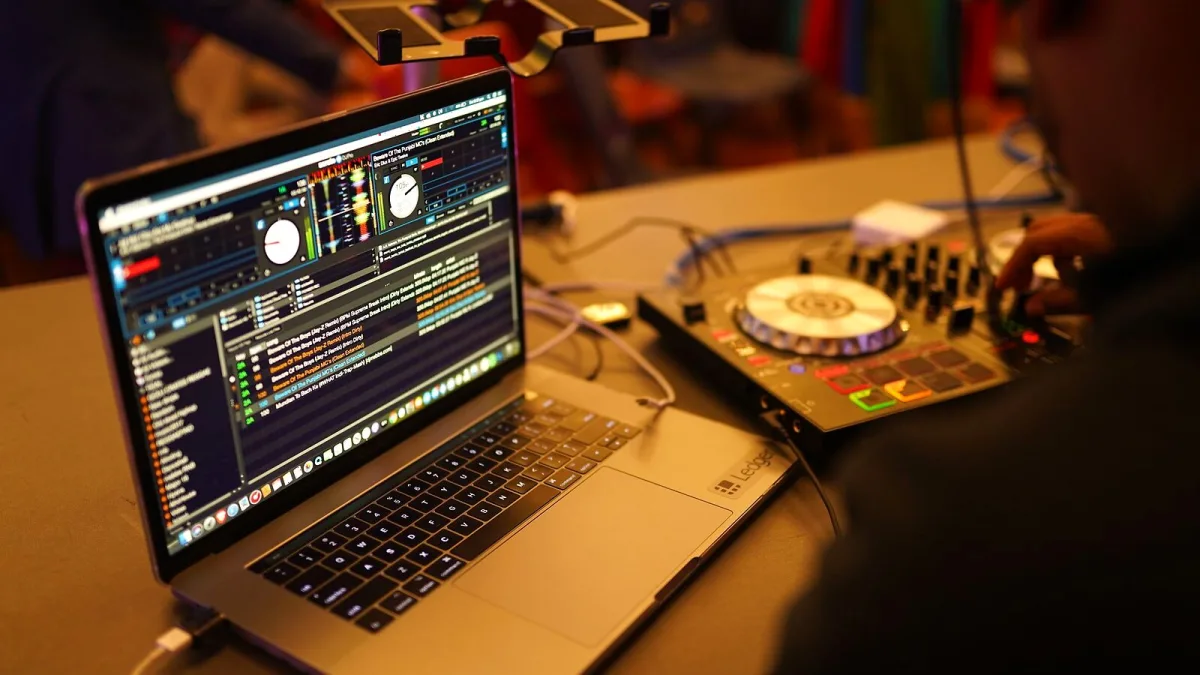
Open a DJ software shortlist and one name keeps turning up whatever the budget: VirtualDJ. Built by Atomix, it has been a fixture of bedroom and mobile setups for years, and the 2026 build adds AI tools, sturdier beatgridding and a direct export route into club hardware. Here is what VirtualDJ actually is, how its pieces fit together, and where it earns its keep.
What VirtualDJ is, in plain terms
VirtualDJ is a Windows and macOS application that replaces a pair of decks and a mixer with software. You load tracks onto virtual decks, the program analyses their beatgrid and waveform, and you blend between them using a mouse, a keyboard, or — far more commonly — a physical DJ controller plugged in over USB. Atomix also builds mobile companion apps, though the desktop version remains the serious tool.
What sets VirtualDJ apart from tidier, more opinionated rivals is breadth. Rather than being built tightly around one hardware family, it is designed to talk to a very wide range of controllers, external mixers and timecode systems, which is exactly why it became the default choice for mobile and wedding DJs who inherit whatever kit a client already owns.
The core building blocks
Strip away the branding and VirtualDJ is really several tools stitched into one window. Understanding the pieces makes the interface far less intimidating.
- Decks and mixing — the licensing page advertises configurations from two decks up to a fairly absurd 99, though in practice almost everyone works with two or four: extra decks tend to be reserved for acapellas, samples, or a karaoke track running alongside the main mix.
- Beatmatching and beatgrids — automatic BPM detection and a visual beatgrid, so tracks line up without manual pitch-riding.
- Stems — real-time separation of a track into vocal, drum, bass and melodic elements, letting you drop the vocal out of an intro or build a mashup on the fly.
- Effects and performance pads — MusicTech has reported a professional FX engine with more than 122 effects in the current build, including some modelled on familiar Pioneer DJ and Rane mixer sounds.
- Video and karaoke — VirtualDJ can play and mix video files and run lyric-driven karaoke sessions, which is a big reason mobile and events DJs favour it over club-only software.
- Timecode and DVS — support for timecode vinyl and CD, so turntablists can control the software from real decks.
Where the 2026 updates take it
The most recent official build (9644, dated 21 September 2026) leans hard into AI-assisted preparation rather than raw playback features. Two additions stand out: Shoutout AI, which generates voiceovers or swaps lyrics on the fly, and Scripting AI, which lets users write custom functions using natural-language prompts instead of hand-coding VDJScript. Alongside these sits a Fluid BPM system with a BPM Stabiliser, aimed squarely at tracks whose tempo drifts — live-band recordings, certain hip-hop cuts, anything that resists a single fixed grid. Digital DJ Tips has described the goal as serving DJs who "mix without the sync button", which is a fair summary: it is there to make manual beatmatching more forgiving, not to replace it.
Perhaps the most practically useful addition, though, is OneLibrary support, AlphaTheta's format for exporting a prepared VirtualDJ library straight onto compatible club hardware — reported to include the CDJ-3000X, CDJ-1500X, XDJ-AZ, XDJ-AN, OPUS-QUAD and OMNIS-DUO. It addresses a genuinely old headache: turning up to a venue and discovering your carefully built cue points and loops do not travel. Even so, it is worth testing an export before you rely on it, since firmware and USB formatting quirks can trip up any cross-platform library transfer.
Types of DJ VirtualDJ suits
| User | Why VirtualDJ fits |
|---|---|
| Mobile and wedding DJs | Broad controller support, karaoke and video tools, and the flexibility to run on whatever hardware a venue supplies. |
| Home practice / bedroom DJs | A genuinely free tier for non-professional use, so you can learn beatmatching, cueing and mixing before spending a penny. |
| Open-format and hip-hop DJs | Stems and Fluid BPM handle tempo-shifting live material better than a rigid, fixed-grid workflow. |
| Club DJs moving between venues | OneLibrary export and wide CDJ/controller compatibility reduce the "which software does this booth run" problem. |
Licensing, briefly
According to the official pricing page, VirtualDJ is free for non-professional use without professional equipment, with a Home licence listed at $4 a month and Pro at $19 a month; a Business tier sits at $99 a month for venues, with annual discounts available. The free tier carries branding and is not built for unrestricted professional controller support, so treat it as a genuine practice tool rather than a gig-ready setup. Prices and terms on software licences change fairly often, so it is worth checking Atomix's own page before committing.
For the buying decision itself — which licence tier, which controller, what to check before you pay — our complete VirtualDJ buyer's guide goes into the specifics.
What to be realistic about
VirtualDJ's flexibility is a double-edged sword. Because it supports so much hardware and so many workflows, the interface exposes a lot of configuration — deck layouts, mapping, audio routing, beatgrid corrections — that a more locked-down rival simply hides. Stem separation, while genuinely useful, is not flawless: artefacts can creep in around reverb, cymbals or dense backing vocals, so audition anything important before you rely on it in front of a room. And "compatible" with a controller does not always mean every jog display, screen or motorised platter behaves exactly as the manufacturer's own software would run it.
If you are just starting out, our beginner's guide to VirtualDJ walks through getting set up without being overwhelmed by all of that. And if you would rather learn from other people's errors first, see our rundown of common VirtualDJ mistakes to avoid.
The bottom line
VirtualDJ earns its long-running popularity by being useful to almost anyone with a laptop and an idea of what a DJ set should feel like — from a nervous first mix at home to a mobile DJ juggling karaoke, video and a rented controller on a Saturday night. It is not the tidiest piece of software on the market, and its free tier is deliberately limited, but few programs match its combination of hardware reach, feature depth and a genuinely free way in.




Comments