


Pioneer DJ DJ Controller article
Pioneer Dj Dj Controller Explained: Features, Types and Tips
A Pioneer DJ controller bridges your DJ software and your ears, giving you hands-on control of decks, mixer and effects. Whether you're learning at home or prepping for bigger venues, understanding the types and features is your first step.
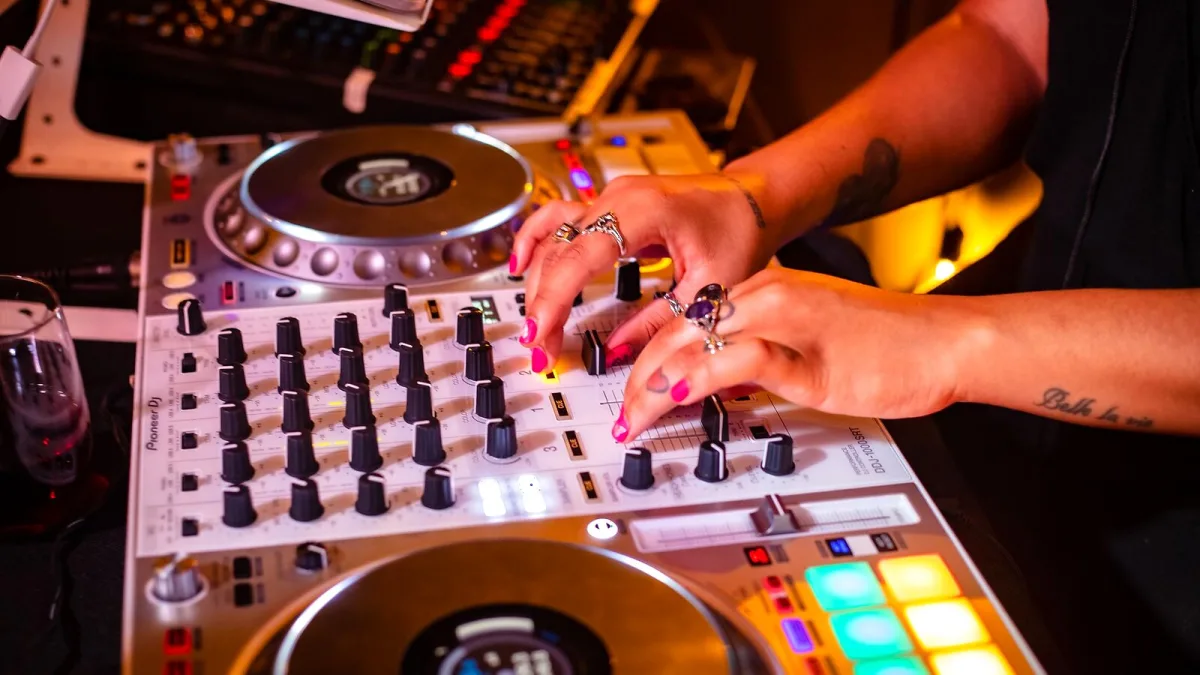
If you've ever sat down at a pair of CDJs in a club and thought "I wish I had these at home," a Pioneer DJ controller is exactly what you're after. These hardware interfaces combine decks, a mixer and all the tactile controls into one unit that sits between your music software and your ears, giving you the hands-on feel of being behind proper turntables without the space commitment or the vinyl collection you'd need to match it. Whether you're spinning in a tiny bedroom or prepping for a bigger venue, understanding what a controller actually does—and which of Pioneer DJ's many models might suit your style—is the first step to getting properly set up.
What a Pioneer DJ Controller Does
A Pioneer DJ controller isn't a standalone music player. Instead, it's a physical bridge between DJ software running on your computer and your ears. The software handles the heavy lifting—track playback, beat detection, library organisation and all the digital wizardry—while the controller gives you the physical controls that a mouse and keyboard simply cannot match. You get jog wheels to nudge tracks forward and backward, faders to blend between songs, and performance pads that trigger loops, hot cues and effects at exactly the moment the music needs them.
The anatomy of a typical Pioneer DJ controller breaks down into clear sections. Two or more virtual decks sit at either end, each with its own jog wheel, play and cue buttons, and tempo control. The mixer section sits in the middle, much like it would in a club: channel faders, a crossfader to blend between decks, three-band EQ for each channel, and a gain control to keep your levels steady. You'll also find master output controls, headphone cueing (essential for quietly queuing up the next track), and on better models, performance pads and effects knobs that add layers of creativity to your mixing.
Main Types of Pioneer DJ Controllers
Pioneer DJ's range covers everything from ultra-compact controllers that fit a laptop bag to four-channel performance beasts. At the entry level sits controllers like the DDJ-FLX2, a genuinely portable machine with a sleek USB-C connection and Bluetooth support, designed to work with multiple software platforms including rekordbox, Serato DJ and djay. It's the sort of controller a curious beginner might grab, or someone who DJs occasionally at small events.
Step up and you'll find two-channel controllers that take up more desk space but offer fuller features: larger jog wheels for more comfortable scratching, dedicated effects sections, and better audio outputs. The club-style layout remains the standard—two decks flanking a mixer, because that's what DJs everywhere recognise and expect.
For producers and DJs who need more room to layer tracks, four-channel controllers like the DDJ-GRV6 bring serious capabilities: full-size jog wheels, effects controls, and the ability to mix four decks simultaneously. There's also the DDJ-REV series, which flips the conventional layout and arranges the controls in a turntable-and-battle-mixer style—favoured by scratch DJs who want a different workflow.
Standalone systems sit at the top of the range. These play music directly from USB drives without needing a laptop, making them much closer to the club-standard CDJ and mixer setup. They cost more and demand careful library preparation, but for serious club work or high-profile events, that independence is invaluable.
Core Features That Matter
When you're looking at a Pioneer DJ controller, several features shape how it actually feels to use. Jog wheels are the most tactile—larger wheels with good resistance let you scratch smoothly, while tiny wheels on budget models can feel cramped. Full-size jog wheels often include small displays showing BPM, waveforms or track position, which is genuinely helpful when you're concentrating on the music rather than the screen.
The mixer section determines how easily you can blend between tracks. Two-channel mixers suit learning and smaller events; four-channel setups let you layer loops, drum breaks and acapellas underneath your main tracks, opening up much more creative mixing. EQ controls are universal, but the quality of the hardware faders and crossfader can vary wildly. A scratchy crossfader that sticks will ruin your day during a performance.
Performance pads can trigger hot cues (custom start points in a track), loops, beat jumps, and effects. On newer controllers, they can also trigger stems—instrumental and vocal elements separated from the original mix—which is handy if you want to isolate a vocal over an entirely different beat. Software effects like echo, reverb, filter and delay add creative options, though some of these are software-only while professional models might include dedicated hardware effects controls.
Audio connections matter more than beginners realise. Entry-level models often have only a small headphone jack and RCA outputs, which limits where you can plug them in. Professional controllers offer balanced XLR master outputs (better for venues with proper PA systems), booth outputs for a separate monitor speaker, multiple microphone inputs for announcements, and auxiliary inputs if you want to mix in vinyl or an external audio source.
Software and the Laptop Question
A Pioneer DJ controller works with software—most commonly rekordbox, Pioneer DJ's own library and mixing platform, or Serato DJ, which is particularly popular with scratch DJs. Some compact models also support djay and Traktor. The software you choose affects your workflow: rekordbox has deep integration with Pioneer hardware and is brilliant for club preparation, while Serato DJ offers a different philosophy and has historically been the choice for battle DJs and scratchers.
Most controllers connect to a laptop and depend on it during your set. That's cheaper than a standalone system and gives you access to your entire music library, but it also means you're tethered to your computer. Crashes happen. Drivers can be troublesome. The screen can become a distraction. For home mixing and learning, it's perfect. For serious events, it's a risk—which is why club DJs and mobile DJs often prefer standalone systems or carry the controller as a backup.
Choosing by Your Intentions
The Pioneer DJ controller that's right for you depends entirely on what you're doing with it. A complete beginner wants something affordable, simple to navigate, with good headphone cueing and broad software support—the DDJ-FLX2 ticks all those boxes. Home hobbyists benefit from better jog wheels, recording capabilities, and a more durable mixer section. Mobile DJs need balanced outputs, solid microphone control, durability and the ability to fit everything into a van alongside lighting and speakers.
Club-focused DJs should choose controllers with a four-channel layout and club-standard arrangement, ideally one that works closely with rekordbox so you can prepare tracks at home and drop them straight into a venue's setup. Scratch DJs prioritise jog-wheel feel, crossfader response and battle-style layout over the number of software features. And if you're an advanced performer who wants the flexibility to work standalone, add effects, incorporate stems or connect external gear, you'll be looking at higher-end systems.
The AlphaTheta Connection
Pioneer DJ now operates under the AlphaTheta corporate banner, though "Pioneer DJ" remains the widely used product name. This matters mainly for future product research: if you're checking specs or seeking support, AlphaTheta and Pioneer DJ listings often pull up the same products, and both names are legitimate. It's not a split or a competitor—it's just the company's current structure. Worth knowing, but nothing to worry about when you're choosing your first controller.
Getting started with a Pioneer DJ controller means understanding what you actually need, testing one in person if you can, and making sure the software matches your workflow. It's one of those rare purchases that properly fits your hands from day one and sticks with you through years of mixing. That hands-on, tactile connection to the music is exactly what people love about DJing in the first place.





Comments