


Focusrite roundup
Focusrite: A Complete Buyer's Guide
Scarlett alone now runs from a one-preamp Solo to a rackmount 18i20 — here's how to work out which Focusrite actually fits your sessions.
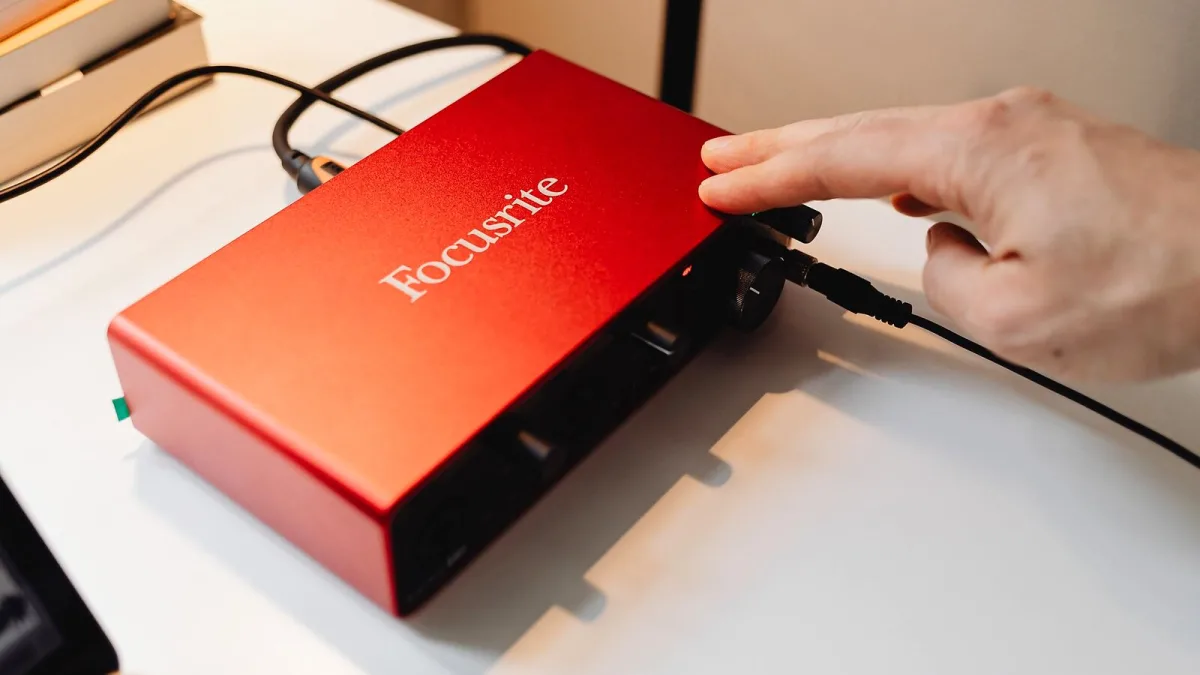
Picking a Focusrite interface should be exciting rather than stressful, but the range has genuinely grown — Scarlett alone now runs from a one-preamp Solo to a rackmount 18i20, and that's before you even look at Clarett+, Vocaster, Red or the new ISA C8X. Let's work through it properly so you buy the Focusrite model that actually matches your sessions, not just the one with the flashiest box.
Work Out Your Inputs First
This is the single most important decision, and it's easy to get wrong in either direction. Recording one vocalist or one guitarist at a time? A Solo is genuinely enough. Want to track a vocal and a guitar together, or run two microphones? You need at least a 2i2. Once you're adding synths, hardware effects or a stereo keyboard into the mix, a 4i4 starts making a lot more sense. If you're planning to record a full band or several microphones on a drum kit, count the actual microphones you'll use before you even look at a Focusrite spec sheet — that number should drive the whole decision.
Scarlett Tiers Compared
| Model | I/O | Good for |
|---|---|---|
| Solo | 1 preamp | Solo vocalist, podcaster, single instrument |
| 2i2 | 2 in / 2 out | Singer-songwriter, two microphones |
| 4i4 | 4 in / 4 out | Adding synths, outboard gear, more monitoring options |
| 16i16 / 18i16 | 16–18 in / 16 out | Small ensembles, several simultaneous mics |
| 18i20 | 18 in / 20 out | Full studio hub with talkback and speaker A/B switching |
Should You Look Beyond Scarlett?
Scarlett covers most home and project-studio needs brilliantly, but three other Focusrite families are worth knowing about. Clarett+ steps up the conversion and connectivity for more demanding project studios that have outgrown Scarlett's ceiling. Vocaster is purpose-built for podcasting, so if speech is genuinely your main output, it's worth comparing against a general-purpose Scarlett before you decide. And Red targets professional and broadcast setups with networked audio and high channel counts — genuinely not necessary unless you're already working at that scale.
The ISA C8X: Focusrite's Premium Preamp Interface
If preamp character matters as much as clean conversion to you, the ISA C8X deserves a look. It combines eight microphone preamps — two built around transformer-based ISA-style circuitry associated with designer Rupert Neve, and six additional low-noise preamps — with extensive routing: 26 inputs, 28 outputs, dual ADAT, S/PDIF and monitoring configurations up to 7.1.4. It's specialist gear for someone who wants that specific analogue-flavoured preamp sound alongside serious I/O, not a first purchase for a home setup.
Air Modes and Auto Features: Worth Paying For?
Fourth-generation Scarlett models add Air (a presence or harmonic-drive tone shaping mode), Auto Gain (which sets a sensible starting level for you) and Clip Safe (which quietly pulls gain back if a signal suddenly spikes). None of these are essential, but Auto Gain and Clip Safe genuinely earn their keep if you often record solo with nobody watching the meters — they catch mistakes a distracted performer might otherwise miss.
Digital Expansion: Think About ADAT Now
If there's any chance you'll want more inputs down the line, check whether your shortlisted model supports ADAT before you buy. It lets you add an external preamp or converter later rather than replacing the whole interface, though remember that available channel count over ADAT shrinks at higher sample rates — worth checking against your actual planned session format rather than assuming the maximum figure always applies.
New, Secondhand or Refurbished?
Focusrite interfaces hold up well on the used market, and a secondhand Scarlett can be genuinely good value if you check a couple of things first. Confirm the unit is a fourth-generation model if you want features like Air, Auto Gain and Clip Safe, since earlier generations don't include them. Ask whether the original USB cable is included, and check that Focusrite Control 2 still supports the exact model and firmware version before you commit — a bargain interface that won't talk to your computer isn't actually a bargain.
A Focusrite Buying Checklist
- Count your actual simultaneous inputs — don't buy for a hypothetical future band.
- Check whether you need MIDI, ADAT or S/PDIF connectivity.
- Confirm your operating system supports the current Focusrite Control 2 software.
- Decide whether Air, Auto Gain and Clip Safe matter for how you actually record.
- If buying secondhand, verify driver and firmware support before paying.
- Budget for a decent microphone and headphones — the interface is only one part of the chain.
For the fuller picture of how the whole range works and what each feature actually does, read our overview of Focusrite. If you're buying your very first interface and want a gentler starting point, our beginner's guide walks through getting set up step by step.
The Bottom Line
Buy Focusrite for the sessions you actually run today, not the ones you might run in five years. Scarlett covers the vast majority of home and project-studio needs comfortably, and stepping up to Clarett+, Vocaster, Red or the ISA C8X only makes sense once a specific, real requirement — channel count, speech-focused workflow, or preamp character — actually demands it.





Comments