


Mic with Recorder article
Mic with Recorder: A Complete Guide
Mic with recorder can mean three different things. Here's how to tell which setup you actually need, and how to get a clean take either way.

"Mic with recorder" is one of those phrases that means slightly different things depending on who's asking. It might mean a handheld recorder with its own built-in microphones. It might mean a separate microphone plugged into a portable recorder. Or, if you play the instrument, it might mean pointing a mic at a recorder to capture a rehearsal or recital. Let's untangle all three, because the right setup for you depends entirely on which one you're actually after.
Three Things "Mic with Recorder" Can Mean
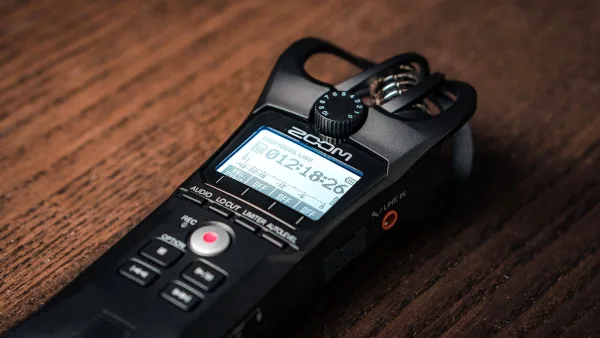
- A handheld recorder with built-in mics — fast to use, usually stereo, ideal for rehearsals and room capture.
- A separate microphone connected to a recorder — more control over placement, polar pattern and tone, at the cost of extra setup.
- Recording the recorder instrument itself — where the microphone is aimed at a soprano, alto or bass recorder rather than being part of the recording device.
Most people asking about a mic with recorder setup for music actually want a bit of all three: something simple enough to grab and press record, but capable enough that a properly placed microphone still sounds good through it.
Built-In Microphones vs an External Mic
A recorder's built-in stereo microphones are genuinely convenient — no cables, no stands, and they're usually positioned sensibly by the manufacturer. They're a strong choice for capturing rehearsals, room sound and live performances where speed matters more than absolute control.
An external microphone earns its extra hassle when you need a specific polar pattern, more distance from the source, or a particular tonal character a built-in capsule can't give you. Whichever way you go, the input gain, the room, and where you actually place things matter more than the price tag on the microphone itself.
Recording a Recorder Instrument
If you actually play the instrument, this is probably why you're here. Shure's guidance is refreshingly simple: a recorder's sound comes from the whole instrument, not one isolated point, so starting with a large-diaphragm condenser positioned just above it — rather than pointed straight into the windway — gives a smooth, rounded result without exaggerating breath noise.
From there, it's a matter of small adjustments: test a few heights and angles, move further back if key noise or breath is too present, and pull back even more on a bass recorder for a warmer, more blended sound.
Stereo or Mono?
| Situation | Best approach | Why |
|---|---|---|
| Solo instrument or ensemble | Stereo | Captures width and natural room ambience |
| Speech or interview | Mono, close mic | Better intelligibility, easier to edit |
| Instrument for a mix | Mono, closer placement | Sits more tightly alongside other tracks |
The Bit Worth Knowing About: 32-Bit Float
Newer recorders, including Tascam's DR-05XP, increasingly offer 32-bit-float recording, which gives substantial extra headroom against unexpected peaks. It's a genuinely useful safety net — but it won't fix microphone distortion, room noise or an overloaded input stage before the signal even reaches the converter. Good gain-setting habits still matter.
Gain, Headroom and Not Ruining the Take
Whatever setup you're using, set your input level so loud passages don't clip — digital clipping sounds harsh and is essentially impossible to fix afterwards. Leave a bit of headroom for the moment a performer plays louder than they did during your level check, especially in a live setting. A limiter helps guard against sudden peaks, though it can subtly change dynamics, and some recorders offer a dual-record safety track at a lower level as extra insurance.
Room Acoustics Matter More Than the Gear
The room is part of every recording whether you plan for it or not. Hard, parallel surfaces throw back strong reflections and can leave a recording sounding boxy or metallic, while a smaller room with soft furnishings tends to sound cleaner even with modest equipment. Before committing to a full take, walk the space, clap once, and listen for anything unwelcome bouncing back.
A Quick Monitoring Checklist
- Use closed-back headphones so the monitor signal doesn't leak back into the microphone.
- Check your left-right balance, not just overall level.
- Listen for hum, cable noise or handling noise before the real take.
- Make a short test recording and actually play it back — don't trust the meters alone.
Getting Started
Whether you're pairing a mic with a recorder for the first time or upgrading an old setup, our beginner's guide walks through your first recording session step by step, and the buyer's guide covers exactly what to check before you spend anything.
The Bottom Line
There's no single right way to combine a mic with a recorder — the correct setup depends on whether you're capturing a rehearsal, an interview, or the recorder instrument itself. Get the placement right, leave yourself gain headroom, and the equipment does most of the rest. For a look at where genuine value sits, see our guide to the best mic with recorder setups for the money, and once you're recording regularly, it's worth reading up on the common mistakes people make.



Comments