


Active PA Speaker article
Active Pa Speaker for Beginners: A Complete Guide
An active PA speaker is the most beginner-friendly way into live sound — because the complicated stuff is already built in. Here is everything you need to know to get started.

Getting into live sound can feel intimidating when you are staring at a wall of equipment with numbers and acronyms plastered all over it. But an active PA speaker is one of the most beginner-friendly bits of kit in the business — because most of the complicated stuff is already done for you. This guide explains what you need to know to get started, in plain English.
What an Active PA Speaker Is and Is Not
An active PA speaker — sometimes called a powered speaker — is a speaker cabinet with its own built-in amplifier. That is the key point. Unlike older passive speakers that needed a separate power amp, a powered speaker just needs two things: a mains power socket and an audio input from your mixer or source. You do not need to understand amplifier impedance, power matching or passive crossover design. The manufacturer has taken care of all of that inside the box.
This is why most beginners find powered speakers so much less overwhelming than passive setups. There are fewer components, fewer cables and fewer things to get wrong.
The Basic Signal Chain
Before you plug anything in, it helps to understand the basic chain of equipment:
- Your audio source — a microphone, guitar, DJ controller or laptop — produces a signal.
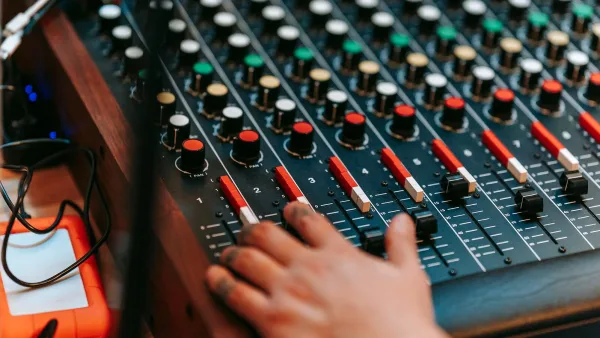
- That signal goes into a mixer (also called a mixing desk or soundboard), where you adjust the levels and EQ.
- The mixer sends the mixed signal to your speaker via an XLR cable — the three-pin audio connector used in professional audio.
- The powered cabinet amplifies the signal internally and sends it to the drivers (the woofer and tweeter), producing sound.
At its simplest, for a solo performer, you can sometimes connect a microphone directly into the speaker's built-in mixer input, skipping the external desk altogether. But as soon as you have more than one or two inputs, an external mixer is the better approach.
Understanding the Back Panel
The back panel can look complicated at first glance. Here is what the main connections do:
- XLR input: This is where the signal comes in from your mixer. XLR is a balanced connector that rejects hum and interference over long cable runs — always use XLR where possible.
- ¼-inch (TRS) input: An alternative balanced input for sources that use a standard jack plug rather than XLR.
- Link (through) output: Sends the input signal to a second speaker, so you can run two speakers from one output on the mixer without buying a splitter.
- Volume/gain control: Sets the input sensitivity. Start with this at roughly 12 o'clock and adjust from there.
- EQ presets: Some speakers have a selector switch for different modes — "Live music", "DJ", "Monitor". Start on "Live music" or "Flat" and adjust by ear.
- Mains socket: Standard IEC or local mains socket for power — you will need a power lead to the mains.
Setting Up for the First Time
For your first setup, keep it simple: one speaker, one microphone, one short signal chain. Here is how to approach it:
- Position the speaker on a pole mount at head height, facing the audience area — not facing the performer, which causes feedback.
- Connect an XLR cable from your mixer's main output to the speaker's XLR input.
- Plug the speaker into mains power and switch it on.
- Start with all volume levels at zero, then slowly bring up the mixer's master fader and then the individual channel levels.
- If you hear a ringing or squealing sound — that is feedback, caused by the microphone picking up sound from the speaker. Move the speaker forward of the microphone position or turn down the channel until it stops.
Common Beginner Questions
How loud do I need?
A single 12-inch model at 700W RMS is enough for most small rooms — 50 to 150 people indoors — when used sensibly. You will never need to run it at full volume. A good rule of thumb: buy slightly more than you think you need, so you are always running it comfortably rather than straining it.
Do I need a subwoofer?
Not necessarily to begin with. A quality 12-inch or 15-inch cabinet covers most of the frequency range you need for vocals, acoustic instruments and speech. If you are doing DJ sets or need deep bass for bands with a drummer, a subwoofer makes a real difference — but it is not a day-one requirement.
What cables do I need?
XLR cables are the backbone of a PA setup. Buy a few good-quality XLR cables of different lengths — 3 metres, 6 metres and 10 metres covers most scenarios. A spare cable is always worth carrying; they fail at inconvenient moments.
The Bottom Line
An active PA speaker is genuinely one of the easiest professional audio tools to get started with. The technology inside handles most of the complexity, so you can focus on the sound rather than the engineering. Start simple, learn by doing, and build from there.
Once you are comfortable with the basics, the full feature explainer covers what is happening under the bonnet. Ready to buy? The buyer's guide will help you choose the right model for your needs and budget.




Comments